Cleaning Up a 600k+ Object Versioned S3 Bucket Using Lifecycle Policies
Deleting a versioned S3 bucket with 600k+ objects using aws s3 rm --recursive can become painfully slow, especially when delete markers and old versions remain behind. This write-up documents using S3 lifecycle policies instead to let AWS handle the cleanup internally.

I ran into this recently while cleaning up a temporary bucket that had accumulated a large number of objects over time. The bucket also had versioning enabled, which changes the deletion behavior quite a bit.
At first I used the usual command: aws s3 rm s3://my-bucket --recursive. Technically, it worked. Practically, it was deleting objects one by one for a very long time. You can literally watch the CLI spam delete operations continuously. For small buckets this is fine. For buckets with many object versions and delete markers, it becomes annoying very quickly.
The important detail here is versioning. With versioning enabled, deleting an object does not necessarily remove the underlying data immediately. S3 creates delete markers, old versions remain, and the bucket is still considered non-empty. So even after the recursive delete finishes, you may still fail when attempting to remove the bucket itself.
I remembered reading an older approach a few years ago: instead of trying to aggressively delete everything from the client side, let S3 clean itself up using lifecycle rules. So instead of fighting the bucket manually, I attached a lifecycle configuration that aggressively expires:
- current objects
- non-current versions
- delete markers
- incomplete multipart uploads
This was the lifecycle configuration I used:
{
  "Rules": [
    {
      "ID": "DeleteAllObjects",
      "Status": "Enabled",
      "Filter": {},
      "Expiration": {
        "Days": 1,
        "ExpiredObjectDeleteMarker": true
      },
      "NoncurrentVersionExpiration": {
        "NoncurrentDays": 1,
        "NewerNoncurrentVersions": 0
      },
      "AbortIncompleteMultipartUpload": {
        "DaysAfterInitiation": 1
      }
    }
  ]
}
Then applied it using:
aws s3api put-bucket-lifecycle-configuration \
  --bucket my-bucket \
  --lifecycle-configuration file://lifecycle.json
And verified it:
aws s3api get-bucket-lifecycle-configuration \
  --bucket my-bucket
After that, there was nothing else to do except wait.
One thing worth noting: lifecycle execution is not immediate. Even if the rule says Days: 1, S3 does not guarantee deletion exactly after 24 hours. In my case, I just left it for a few days. Around day 3, the bucket finally became empty enough to delete cleanly.
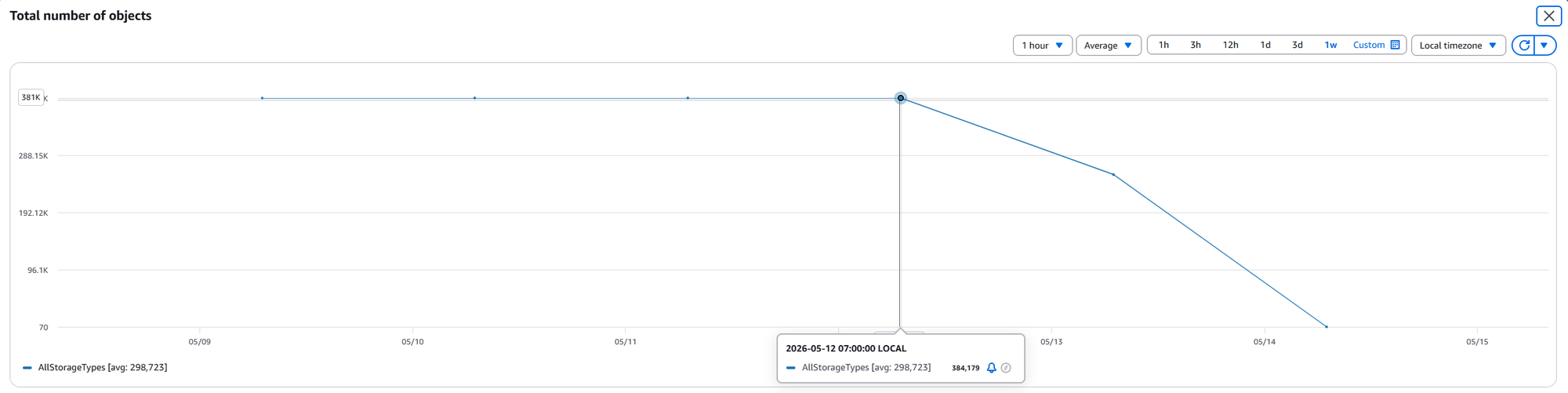
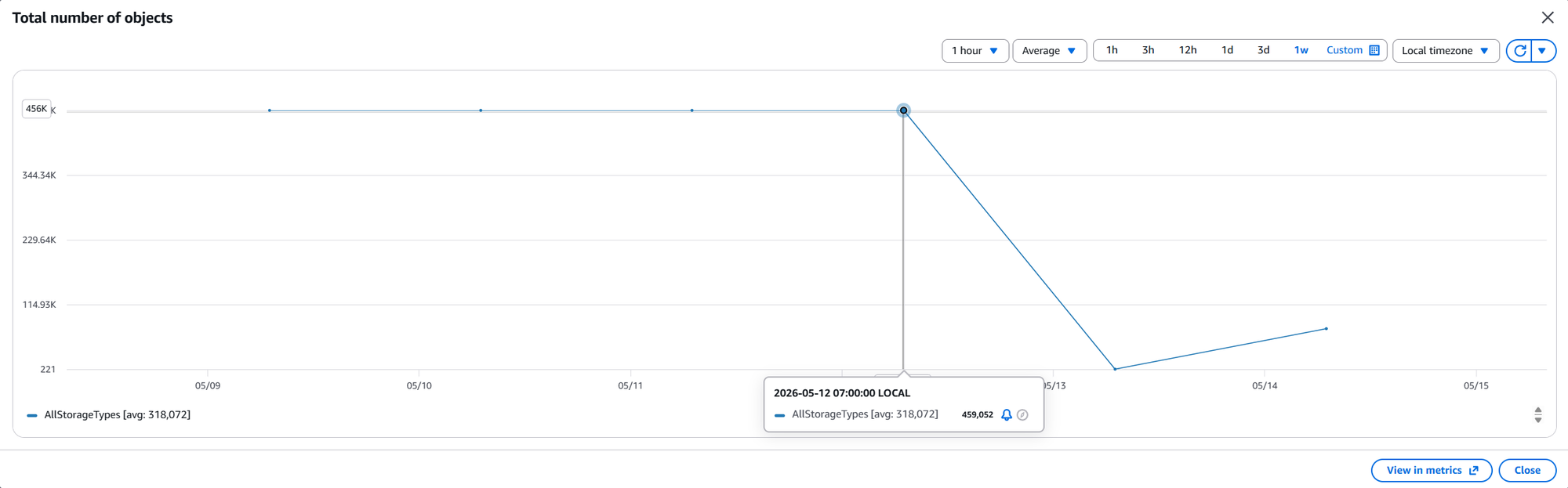
The nice part of this approach is that S3 handles deletion internally instead of your local machine issuing massive delete requests continuously. No long-running terminal session, no retry loops, no watching object counters decrease one by one.
If the requirement is immediate deletion, this is probably not the right approach. But for old temporary buckets where time is less important than operational simplicity, lifecycle policies are significantly less painful than hammering the bucket with recursive delete commands for hours.
Simple enough. Sometimes the best cleanup job is the one you let AWS do for you.