Cleaning Up My Instagram Following List with Python
A walkthrough on exporting Instagram data, parsing followers and following JSON files, and finding accounts that do not follow you back.

Over the weekend I noticed my Instagram following count was close to 1000. I opened the app and scrolled through my following list. Honestly, I had no idea who half of those people were. Old classmates, random accounts I followed years ago, bots. It was a mess.
I figured it was time to clean up. But manually checking each account is painful when you are close to the 1000 mark. So I looked for a faster way.
Here is how I did it.
Step 1: Export your Instagram data
Meta lets you download your Instagram data. It is an official feature, so no third-party tools or shady websites involved.
You can access it from your account settings, or use this direct link:
https://accountscenter.instagram.com/info_and_permissions/
Click "Download or transfer information," then "Download your information." Select Instagram, choose "Some of your information," and pick "Followers and following" under the Connections section. Uncheck everything else to keep the export small.
For the date range, I selected "All time." For the format, I chose JSON. JSON is easy to parse with Python.
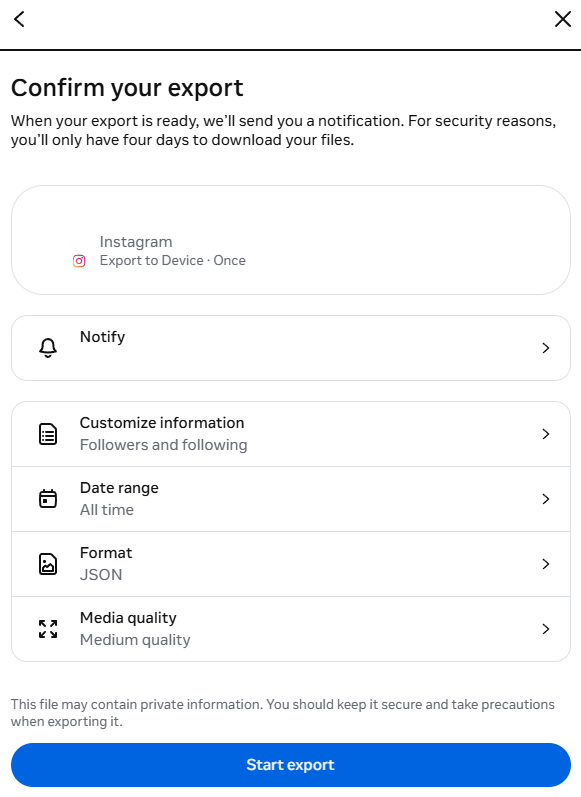
Start the export. It will take a few minutes depending on how many followers and following you have. In my case, it took about 5 minutes. I got two email notifications: one saying the download request was in progress, and another saying the download was ready.
Step 2: Download and extract the zip
Once the export is ready, download the zip file from Meta and extract it. You will find the data files you need inside.
If you have fewer than 10,000 followers and following, you will see followers.json and following.json. If you are over that limit, Meta splits the data into multiple files. In my case I got followers_1.json and followers_2.json. I just merged them before running the script.
Step 3: The Python script
I wrote a quick Python script to compare the two sets and find accounts I follow that do not follow me back.
Here is the code:
import json

with open("followers.json", encoding="utf-8") as f:
    followers = json.load(f)

with open("following.json", encoding="utf-8") as f:
    following = json.load(f)

followers_set = {
    item["string_list_data"][0]["href"].rstrip("/").split("/")[-1]
    for item in followers
    if item.get("string_list_data")
}

following_set = {
    item["string_list_data"][0]["href"].rstrip("/").split("/")[-1]
    for item in following["relationships_following"]
    if item.get("string_list_data")
}

not_following_back = sorted(following_set - followers_set)

with open("not_following_back.txt", "w", encoding="utf-8") as f:
    for username in not_following_back:
        f.write(f"https://www.instagram.com/{username}\n")

print(f"Saved {len(not_following_back)} accounts to not_following_back.txt")
The logic is simple. I load the followers and following data, extract the username from each entry, put them into sets, and compute the difference. Accounts in my following set but not in my followers set are the ones not following me back.
One thing to note: the structure for following and followers JSON is slightly different. Followers is a flat list, while following is wrapped inside a relationships_following key. The script handles that.
Step 4: Review the output
The script writes a list of Instagram profile URLs into not_following_back.txt.
https://www.instagram.com/username_1
https://www.instagram.com/username_2
...
In my case, I had about 350 accounts that were not following me back. Some of them were media and brand accounts that I still want to follow. That is fine. I was mostly looking for personal accounts that do not follow me back so I could clean them out.
I opened the file, visited the profiles I was unsure about, and manually unfollowed the ones I did not need anymore.
Closing thoughts
This approach saved me a lot of time compared to manually scrolling through my following list. The Instagram data export is a solid feature. It gives you clean JSON files that you can process however you want.
One thing I might explore next is automating the unfollow step using Instagram's API or something like Playwright. But for now, manual review was good enough. I only had 350 accounts to sort through, and most of them I recognized immediately.