Domain Migration for Ghost CMS Using Cloudflare Redirects
This write-up outlines a subdomain-to-root migration for a Ghost CMS instance running in Docker behind Cloudflare Tunnel. The approach relies on edge-level 301 redirects, application-level canonical updates, and proper validation to preserve URL structure and search engine signals.

This migration was done on a small but production setup: Ghost CMS running in Docker, exposed through Cloudflare Tunnel, with DNS and edge rules managed in Cloudflare. Google Search Console was already configured for the old subdomain.
The blog originally lived at docs.anantafatur.dev, while anantafatur.dev served as a simple one-page personal landing page linking to LinkedIn, YouTube, and the blog. After getting my first job, that landing page no longer had a real purpose. The blog was the only meaningful content, so it made more sense for it to live on the root domain.
The constraints were clear. All existing URLs must continue to work. Old links must redirect automatically. Search engines must understand that this is a permanent move.
Freeing the Root Domain
Before touching redirects, I first moved the landing page content to another archival domain. This ensured that anantafatur.dev was no longer serving anything.
Only after the root domain was fully free did I repoint it to Ghost. This avoids any overlap period where both domains might serve different content.
Nothing fancy here. Just making sure the target domain is clean before redirecting traffic into it.
Implementing the Redirect at the Edge
The redirect is the most critical part of the migration. I chose to implement it in Cloudflare rather than inside Ghost. Redirecting at the edge ensures the application never even sees requests for the old domain, and it keeps the backend configuration simpler.
In Cloudflare Redirect Rules, I created a rule with the condition: http.host eq "docs.anantafatur.dev" and the action uses a dynamic expression: concat("https://anantafatur.dev", http.request.uri) with status code set to 301.
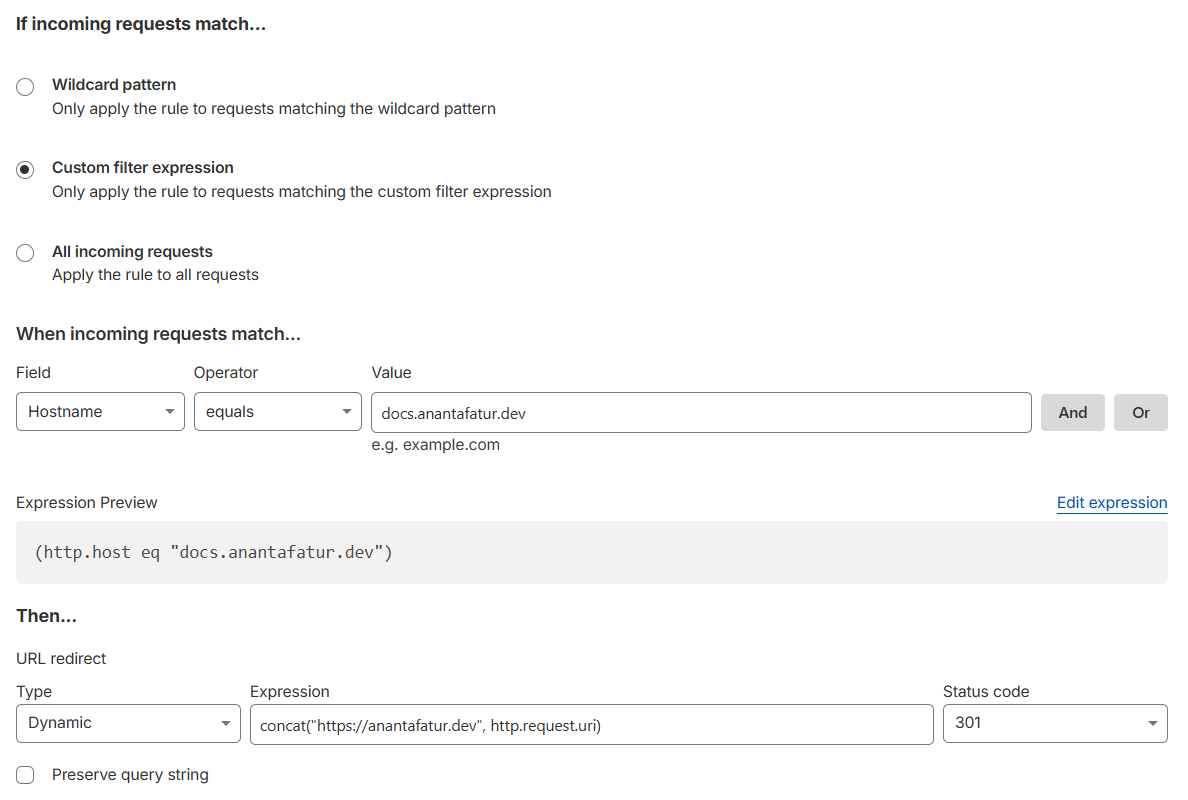
Initially, I tried a static redirect pointing to https://anantafatur.dev. That worked, but it dropped the path entirely. So any deep link redirected only to the homepage. That’s not acceptable. I also experimented with ${path}, but Cloudflare encoded it into %7Bpath%7D, treating it as a literal string. That one wasted a few minutes.
Using http.request.uri preserves both path and query string. After applying the rule, a request to: https://docs.anantafatur.dev/devops-job-hunting-flow-a-sankey-analysis/ correctly redirects to: https://anantafatur.dev/devops-job-hunting-flow-a-sankey-analysis/
Once this was confirmed, the redirect layer was considered stable.
Updating Ghost Configuration
Since Ghost is running in Docker, configuration is controlled via environment variables. I updated the .env file to: GHOST_URL=https://anantafatur.dev
Then restarted the service: docker compose down && docker compose up -d
Ghost uses this value for canonical URLs and sitemap generation. After redeploying, I verified that https://anantafatur.dev/sitemap.xml contained only root-domain URLs. I also checked the page source of a blog post to confirm that the <link rel="canonical"> tag pointed to the new domain.
No database changes were required. Ghost handled the domain switch cleanly as long as GHOST_URL was correct.
Updating cloudflared Tunnel
The Cloudflare Tunnel already existed for the subdomain, pointing to http://localhost:8088. I reused the same tunnel and simply added a new public hostname entry for anantafatur.dev, pointing to the same backend address.
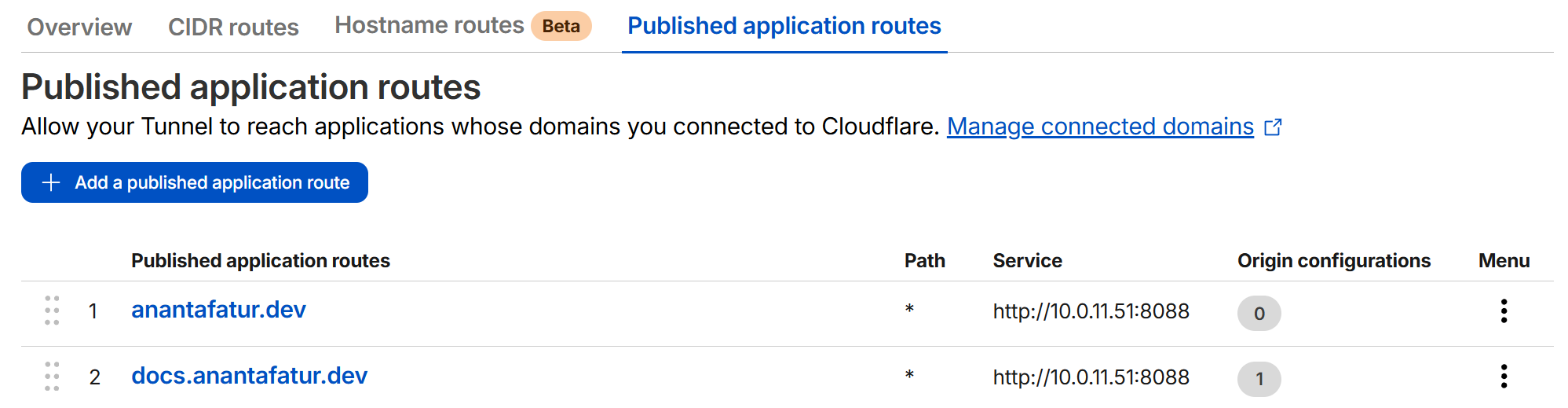
This means:
- Root domain now serves Ghost through the tunnel.
- The redirect is handled at the Cloudflare edge before traffic is forwarded to the tunnel, so the backend does not receive requests for the old subdomain.
No changes were required to container networking or service ports.
Verifying Redirect Behavior
Before touching Google Search Console, I verified everything at HTTP level. I ran: curl -I https://docs.anantafatur.dev/devops-job-hunting-flow-a-sankey-analysis/
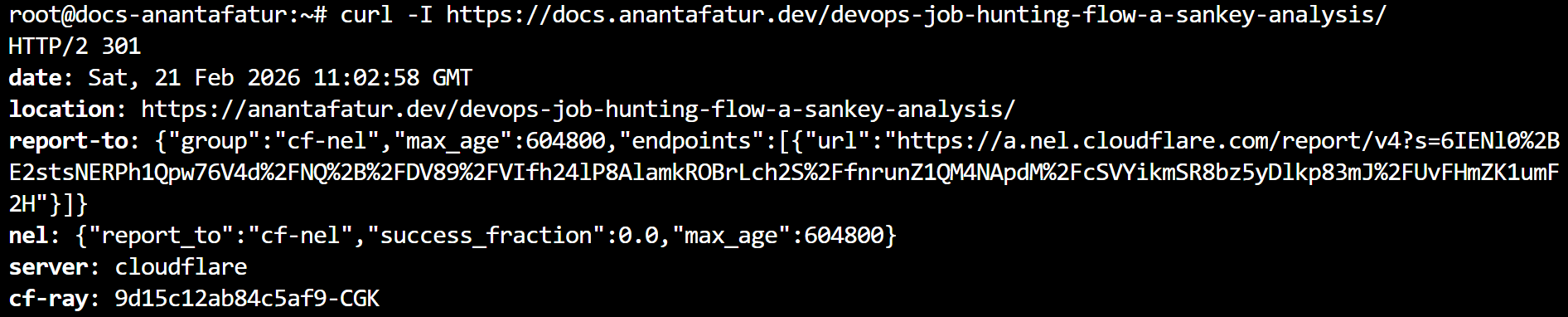
The response returned HTTP/2 301 with a location header pointing to the correct root-domain URL, and server: cloudflare, confirming the redirect happens at the edge.
Downtime during the switch was around one minute, mostly during container restart. From observation, redirect response is effectively immediate, but no formal measurement was taken.
Updating Google Search Console
In the old property for docs.anantafatur.dev, I used the Change of Address tool to notify Google of the migration to anantafatur.dev. After that, I submitted the new sitemap under the root-domain property.
I also used URL Inspection on a few old URLs to confirm Google sees the 301 response. After that, I left it alone. No forced reindexing or aggressive resubmission.
Post-Migration Observations
After the migration, old URLs consistently returned 301 responses, new URLs loaded correctly, canonical tags pointed to the root domain, and the sitemap contained only the new domain.
I have not measured ranking changes or traffic differences yet. From a technical standpoint, the migration follows expected best practices. How Google adjusts ranking will depend on its crawling and indexing timeline.
The entire process took under ten minutes of actual work, with about one minute of downtime. And honestly, having the blog directly on the root domain just feels cleaner.