Ghost CMS 6.19.1 Upgrade [SQLi Patch CVE-2026-26980]
Ghost was upgraded to version 6.19.1 to address a critical SQL injection vulnerability (CVE-2026-26980) in the Content API. The database migrations required a manual fix because of a prior MySQL to MariaDB migration, and Cloudflare WAF was implemented for additional protection.
![Ghost CMS 6.19.1 Upgrade [SQLi Patch CVE-2026-26980]](https://images.unsplash.com/photo-1610128833598-628337ed45a1?crop=entropy&cs=tinysrgb&fit=max&fm=jpg&ixid=M3wxMTc3M3wwfDF8c2VhcmNofDF8fHBhdGNoaW5nfGVufDB8fHx8MTc3MTM4NjkzNXww&ixlib=rb-4.1.0&q=80&w=1200)
One morning I got an alarming email from Ghost: my site was vulnerable to a SQL injection in the Content API (CVE-2026-26980). Basically, anyone could read arbitrary database data with the public API key. The patch was out in 6.19.1, so the first step was obvious — upgrade from ghost:6.10.3-alpine3.23 to ghost:6.19.1-alpine3.23. MariaDB stayed on 10.6.24-jammy.
I knew this wouldn’t be just a “docker pull and go” situation, the database already had some custom tables, so migrations could easily break.
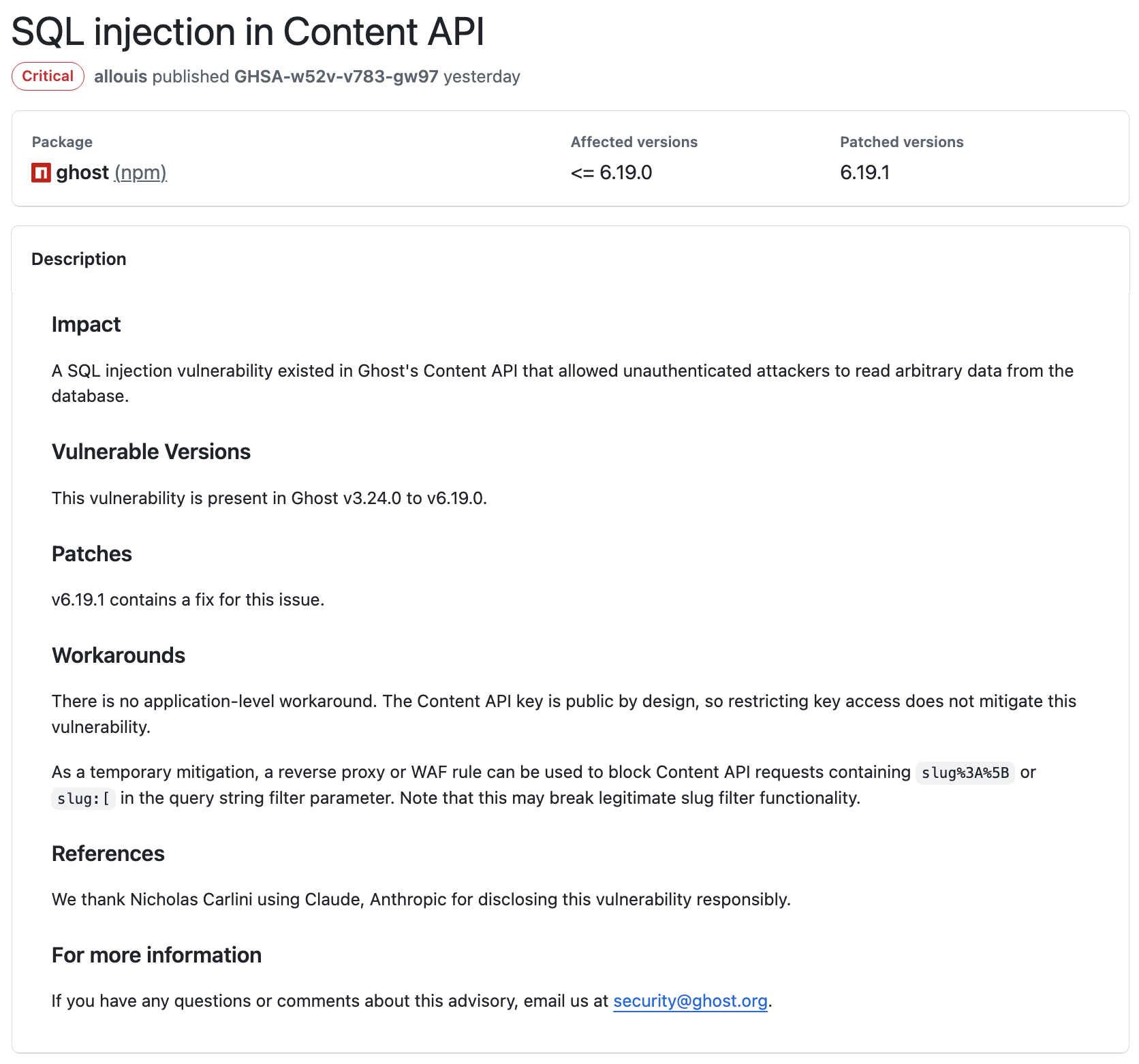
For reference, the official Ghost security advisory is here: https://github.com/TryGhost/Ghost/security/advisories/GHSA-w52v-v783-gw97
Step 1 — Backup Everything
Before touching anything, I backed up the Ghost content and the database. Always save yourself from a potential disaster.
Backup Ghost content:
docker cp ghost-cms:/var/lib/ghost/content /tmp/ghost-content-backupBackup MariaDB:
docker exec ghost-mariadb mysqldump -uroot -p ghost > /tmp/ghost-db-backup.sqlGood. Content safe. Database safe. Heartbeat slightly steadier.
Step 2 — First Attempt at Upgrade
Updated docker-compose.yml to:
#image: ghost:6.10.3-alpine3.23
image: ghost:6.19.1-alpine3.23
Then did the usual:
docker compose down && docker compose upMariaDB started fine. Ghost… failed immediately. Logs showed this horror:
Can't create table `ghost`.`automated_email_recipients` (errno: 150 "Foreign key constraint is incorrectly formed")
Ah yes, the infamous FK error. I knew this looked familiar: Ghost migrations assume numeric IDs for some tables, but in my case, automated_emails.id was varchar(24). Not compatible.
Checked it just to confirm:
SHOW CREATE TABLE automated_emails;Yep. id was varchar. No wonder MySQL/MariaDB refused the foreign key.
Why I Call This a "Custom Table"
When I say "custom table", I don’t mean a plugin added it or Ghost feature magic. I mean the schema in the database didn’t match what Ghost expected for migrations.
This happened because I previously migrated from MySQL (mysql:8.0-bookworm) to MariaDB (mariadb:10.6.24-jammy). That migration subtly changed some column definitions, like automated_emails.id becoming VARCHAR(24) instead of a numeric type. Ghost migrations tried to make automated_email_recipients.automated_email_id a BIGINT UNSIGNED and reference automated_emails.id, and MariaDB refused, hence the foreign key error. Essentially, the table is “custom” because its schema diverged from the default Ghost schema due to a previous migration. You can read more about that MySQL → MariaDB journey here: https://anantafatur.dev/how-i-saved-77-docker-memory-by-migrating-mysql-to-mariadb/
Step 3 — Manual Fix
Then I created automated_email_recipients manually with the correct column types to satisfy the foreign key constraint.
CREATE TABLE automated_email_recipients (
    id VARCHAR(24) NOT NULL,
    automated_email_id VARCHAR(24) NOT NULL,
    recipient_email VARCHAR(191) NOT NULL,
    created_at DATETIME NOT NULL,
    updated_at DATETIME DEFAULT NULL,
    PRIMARY KEY (id),
    KEY automated_email_id_index (automated_email_id),
    CONSTRAINT automated_email_recipients_automated_email_id_foreign
        FOREIGN KEY (automated_email_id)
        REFERENCES automated_emails (id)
        ON DELETE CASCADE
) ENGINE=InnoDB DEFAULT CHARSET=utf8mb4 COLLATE=utf8mb4_unicode_ci;
Restarted Ghost container, and finally migrations completed without a single error. Site came up. Sweet relief.
Step 4 — Cloudflare WAF Double Protection
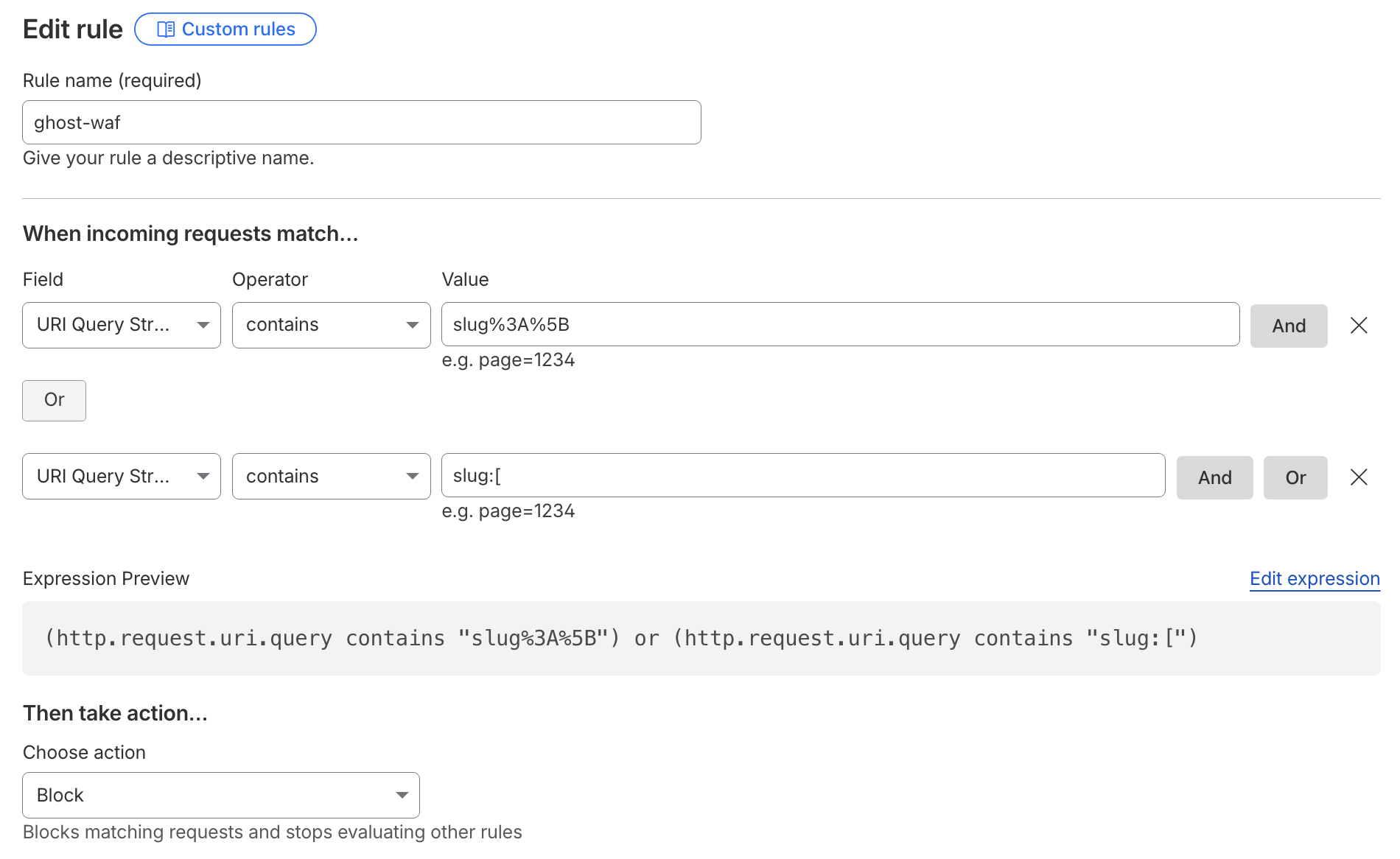
Even though Ghost 6.19.1 patched the SQLi, I wanted extra insurance. Because the Content API key is public by design, restricting access does nothing. So I set up a Cloudflare WAF rule to block obvious malicious queries:
(http.request.uri.query contains "slug%3A%5B") or (http.request.uri.query contains "slug:[")
Action: Block, then saved & deployed. Some legitimate slug filters may break, but I accepted that risk until everything stabilized.
All patched up, database happy, and the WAF doing its thing. Not the smoothest ride, but it worked, and that’s what matte