GitLab CI Pipelines Stuck After RDS Storage Filled Up
Debugging GitLab CI pipelines stuck at "created" status, tracing the problem from a full EC2 root disk through an EBS resize that didn't fix anything, down to the real cause: an RDS PostgreSQL instance running low on storage from a growing, unconsumed replication slot.

We run GitLab self-hosted on an EC2 instance, with PostgreSQL on RDS and Redis on ElastiCache. About an hour before I started writing this, the EC2 root disk hit 100% and GitLab got very laggy. I resized the EBS volume, thought that was the fix, and moved on. Thirty minutes later, every CI pipeline was stuck at "created" and never moved to "pending" or "running." This is what actually happened
The first symptom: a full disk and a laggy GitLab
The EC2 instance's root volume filled up to 100%. GitLab got slow, as expected when a machine can't write logs or temp files. The obvious first move was to increase the EBS volume size, so I did that through the AWS console.
After the resize, the volume status showed "optimizing," which is normal for EBS after a size change. It stays usable during that window, just with reduced IOPS/throughput until the background rebalancing finishes.
I expected this to fix things. It didn't.
What I ruled out early
Thirty minutes after the EBS resize, every pipeline in GitLab was stuck at "created." Not "pending," not "running," just sitting there. No runner was picking anything up.
First thing I checked: did the EBS resize actually apply at the OS level? Increasing an EBS volume's size in AWS does not automatically grow the filesystem, you usually need to run growpart and resize2fs (or xfs_growfs) on the instance itself. So I checked:
root@<ec2-hostname>:~# df -h
Filesystem      Size  Used Avail Use% Mounted on
/dev/root       437G  334G  103G  77% /
...
/dev/nvme1n1    500G  435G   66G  87% /var/opt
Turned out the filesystem had already grown correctly. Root was at 77% with 103G free, and /var/opt (where GitLab's data lives) was at 87% with 66G free. So the local disk was not the bottleneck anymore. That ruled out the thing I originally suspected, which was a bit annoying because it meant the real cause was somewhere else.
Pipelines being stuck at "created" (not even "pending") is actually a clue in itself. That status means GitLab has not finished processing the pipeline, which happens in a background job called PipelineProcessWorker, run by Sidekiq. It is not a runner problem at that stage, it is a Sidekiq/database problem. So I stopped looking at runners and started looking at Sidekiq.
The investigation
I checked if GitLab could even talk to the database:
root@<ec2-hostname>:~# sudo gitlab-rails runner "puts ActiveRecord::Base.connection.active?"
false
That's a bad sign. false means Rails cannot get an active connection to Postgres. Since we run Postgres on RDS and Redis on ElastiCache, this pointed away from the EC2 box and toward RDS itself.
I checked RDS in the CloudWatch console and found the actual culprit:
FreeStorageSpace(minimum, last 3 hours): only 5GB free, out of a 40GB allocated volume.OldestReplicationSlotLag: climbed from about 5MB to 250MB over the same window.FreeableMemory: stable at 8 to 10GB the whole time, so memory was never the issue.
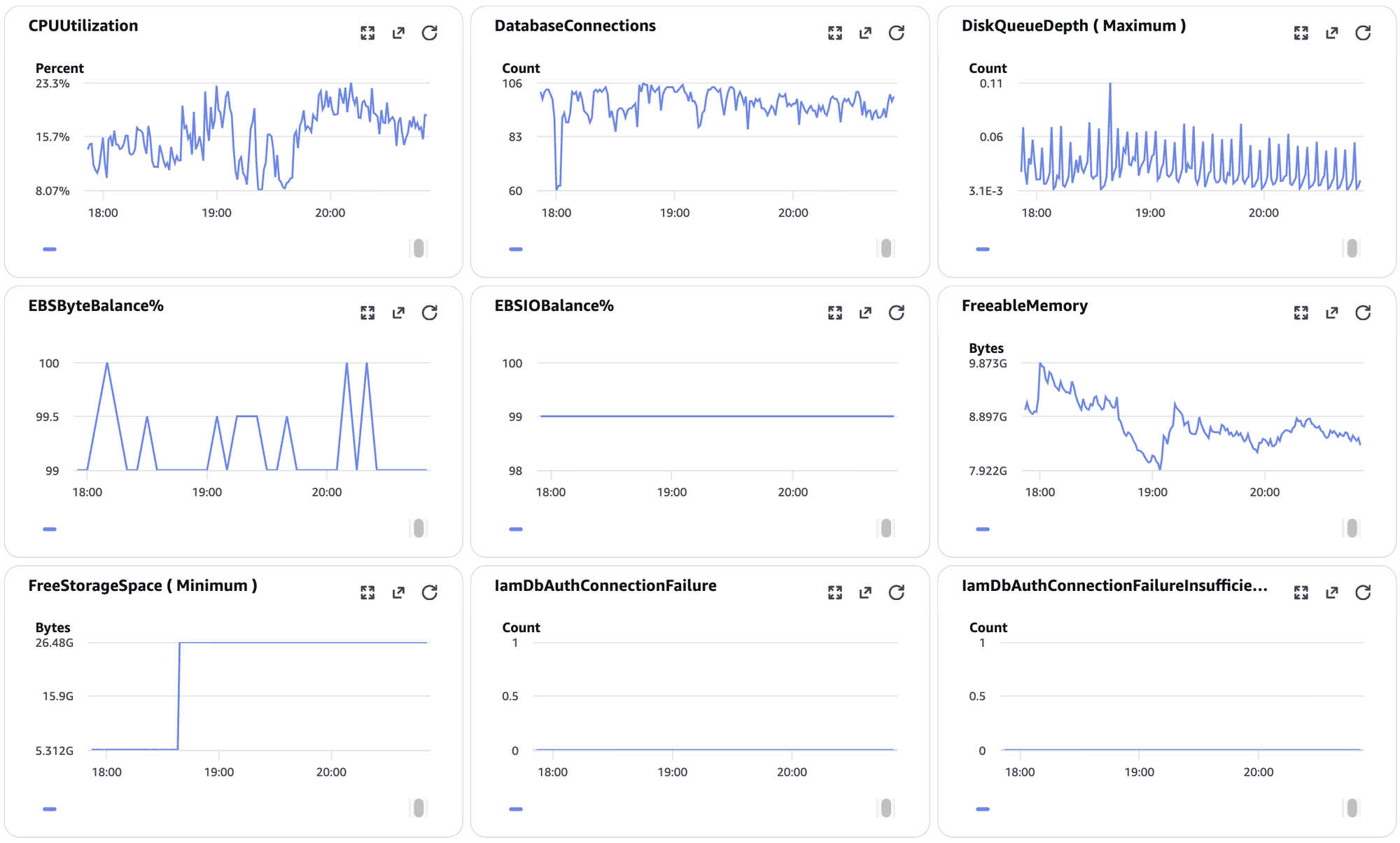
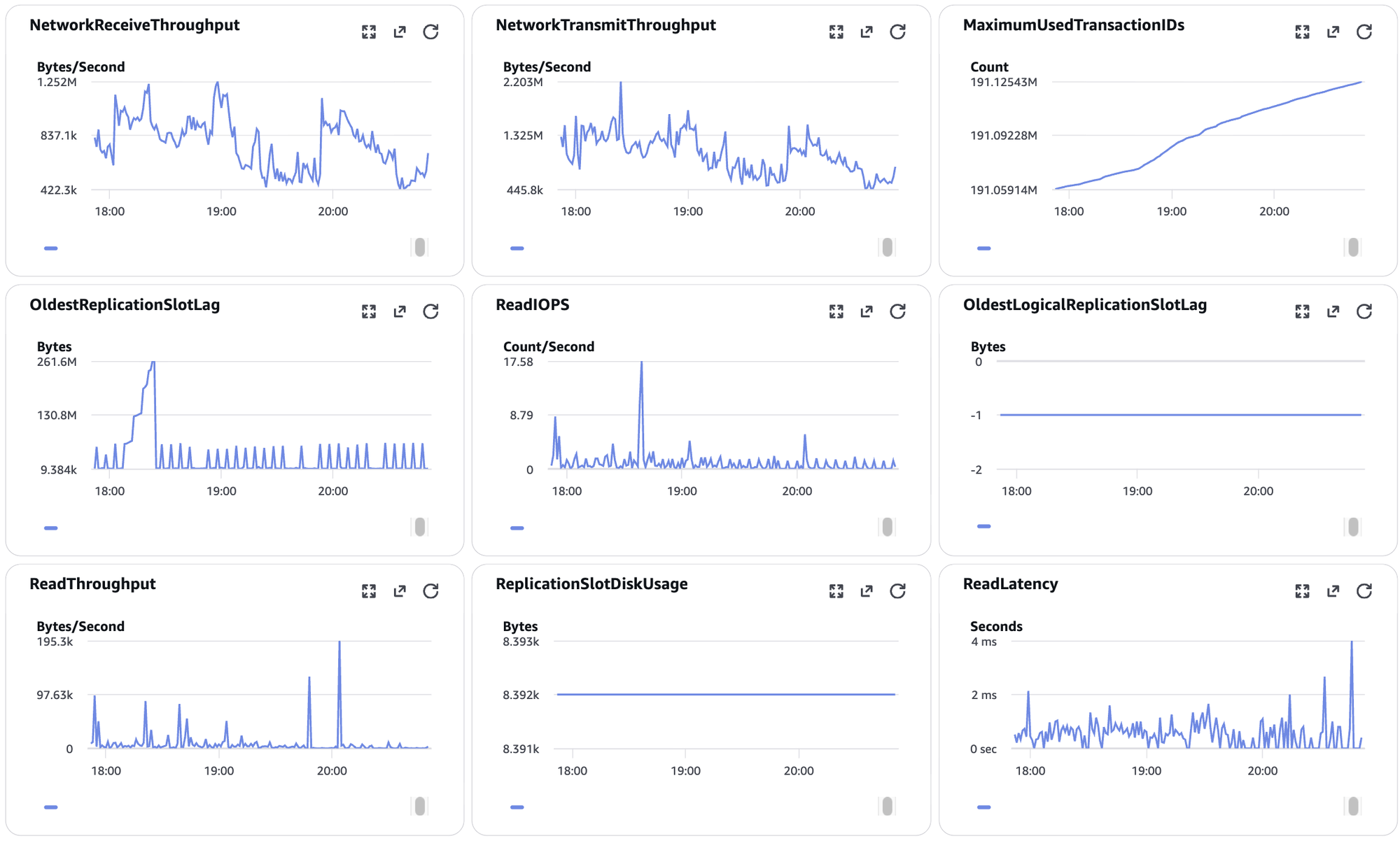
That OldestReplicationSlotLag number is the key clue. In Postgres, a replication slot holds onto WAL (write-ahead log) files until whatever is supposed to consume that slot actually reads them. If nothing is consuming the slot, WAL just piles up on disk and never gets purged. That's exactly what was eating the RDS storage. The disk-full event on EC2 an hour earlier and the RDS storage pressure were probably two separate symptoms of the same underlying slowdown, not directly causing each other, but both draining resources around the same time.
At 5GB free and actively climbing, RDS was close to going into a degraded state. I have read that Postgres on RDS can effectively stop accepting writes once storage is completely full, and I did not want to find out what that looks like in production.
The fix
First move: get some breathing room immediately. I bumped RDS allocated storage from 40GB to 60GB. This is a live, non-disruptive change (no failover, no reboot, for a storage-only modification):
aws rds modify-db-instance \
  --db-instance-identifier <rds-instance-id> \
  --allocated-storage 60 \
  --apply-immediately
I confirmed it landed cleanly by checking RDS events:
{
  "Message": "Applying modification to allocated storage",
  "Date": "2026-08-21T11:37:15+00:00"
},
{
  "Message": "Finished applying modification to allocated storage",
  "Date": "2026-08-21T11:39:38+00:00"
}
No storage-full event, no failure, just a clean resize. The instance briefly sat in "storage-optimization" status afterward, which is normal, the DB stays available and writable during that.
After the resize, FreeStorageSpace went from 5GB minimum up to 25GB, and OldestReplicationSlotLag started coming back down instead of climbing. That was the real turning point.
Before restarting anything on the GitLab side, I wanted to actually confirm Sidekiq needed a restart, instead of just restarting blindly. I tailed the Sidekiq log:
sudo gitlab-ctl tail sidekiq
and found jobs completing successfully, with real database writes:
"class":"CreatePipelineWorker",
"job_status":"done",
"duration_s":10.039718,
"db_primary_write_count":2,
"queue_duration_s":265.244705
No PG::ConnectionBad, no ActiveRecord::ConnectionNotEstablished, nothing indicating a broken connection. The jobs were working, they had just been sitting in the queue for about 4 to 5 minutes (queue_duration_s around 265 to 271 seconds) before a worker picked them up. That is backlog, not breakage. GitLab had been effectively down for close to an hour, so a lot of jobs had queued up in Redis and Sidekiq was now working through all of it.
So I did not restart Sidekiq or Puma. A restart at that point would have killed in-flight jobs and their retries, which would have made the backlog worse, not better. I just watched the queue duration and the pipeline list in the UI, and gave it time to clear the backlog.
Pipelines started moving from "created" to "pending" to "running" on their own as the backlog cleared.
Root cause
The chain of events, as best I can piece it together:
Something (I still don't know exactly what) drove a replication slot on RDS to stop being consumed, or to fall far behind. That slot held onto WAL files instead of letting Postgres purge them, which slowly ate away at FreeStorageSpace.
RDS storage dropped to 5GB free, right around the same time the EC2 root disk also filled up and GitLab got laggy. With RDS under storage pressure, database writes from GitLab (including pipeline creation and processing) started failing or timing out. Jobs backed up in the Sidekiq/Redis queue instead of being processed.
Even after I resized the EC2 EBS volume, none of that helped, because the actual problem was on the RDS side the whole time. Pipelines stayed stuck at "created" until RDS storage was increased.