Reducing PostgreSQL Storage on TencentDB by Cleaning pg_log
A walkthrough of investigating a false PostgreSQL disk usage alert on TencentDB and reducing storage by cleaning pg_log retention.

Last week I got an alert from my friend's monitoring system. The PostgreSQL database storage utilization was at 139.68%.
That number looked wrong. TencentDB allows storage to scale above the committed size, but 139% is still unusual. The database was not even in use yet. It was still running an incremental DTS task. How could the data be that high?
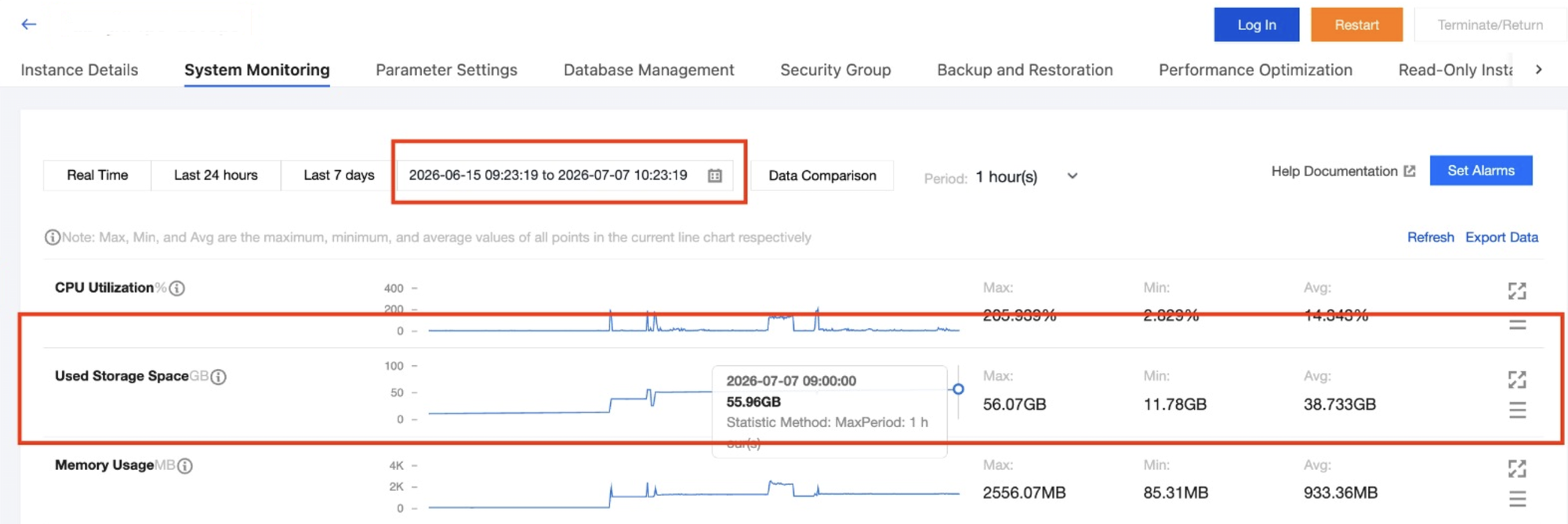
I checked the TencentDB system monitoring. The used storage was valid according to the dashboard. It showed 55GB used, with only 40GB committed.
Then I checked the actual database size with a query.
SELECT
    datname AS database,
    pg_size_pretty(pg_database_size(datname)) AS size
FROM pg_database
ORDER BY pg_database_size(datname) DESC;
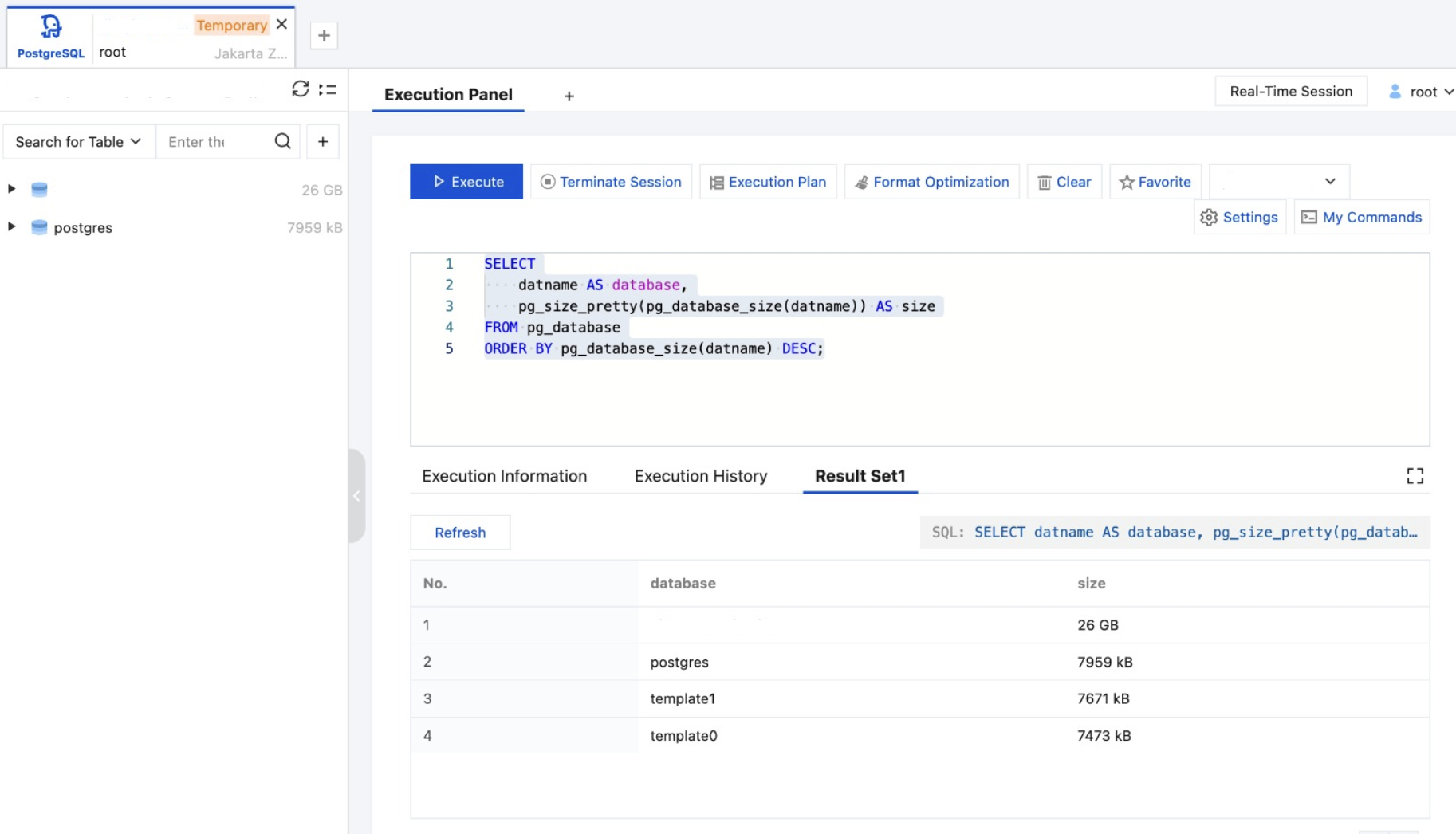
The result showed only 26GB across all databases. There was a gap of almost 30GB between what PostgreSQL reported and what TencentDB showed. I had no idea where the extra space went. Maybe WAL files? Maybe logs? I was not sure.
So I raised a ticket to Tencent support.
What Tencent Support Found
Their answer came back quickly. Here is what they said:
We have confirmed that the WAL logs occupy 8GB, and the remaining 48GB of storage is taken up by pg_log and data files.
The WAL parameters cannot be reduced, as an overly small setting will cause synchronization failures between primary and standby instances. You may consider adjusting the pg_log retention settings to free up space.
So the breakdown was:
- Database: 26GB
- WAL logs: 8GB (cannot be reduced)
- pg_log and data files: 48GB (could be reduced)
- Total: 55GB (committed: 40GB)
The pg_log was the culprit. TencentDB for PostgreSQL retains pg_log by default for 30 days. That adds up quickly.
Reducing pg_log Retention
The fix was to reduce the log retention from 30 days to 7 days. TencentDB has a parameter called log_filename that controls this.
The parameter accepts two values:
postgresql_%d_%H.log— keeps logs for 30 days (default)postgresql_%a_%H.log— keeps logs for 7 days
There is also tencentdb_max_logfile_num which sets the maximum number of log files. The system generates one log file per hour. So for 7 days retention, you need at least 7 x 24 = 168 files.
Step 1: Change log_filename
In the TencentDB console, go to the instance details page, find Parameter Settings, and search for log_filename. Change it to postgresql_%a_%H.log.
Step 2: Change tencentdb_max_logfile_num
In the same Parameter Settings page, search for tencentdb_max_logfile_num and set it to 168.
The minimum value for this parameter is 100. The value 2147483647 means retain everything.
Step 3: Rotate logs immediately
After changing the parameters, you can force a log rotation to clean up immediately.
SELECT pg_rotate_logfile();
This kicks the kernel to rotate and clean old log files based on the new retention settings.
Step 4: Verify the changes
Run this query to confirm both parameters are applied.
SELECT name, setting, unit, context
FROM pg_settings
WHERE name IN ('log_filename', 'tencentdb_max_logfile_num');
The result should look like this.
"log_filename","postgresql_%a_%H.log",,"sighup"
"tencentdb_max_logfile_num","168",,"sighup"
The Result
After applying the changes, the used storage dropped to 36GB. That is a reduction of 19GB just from cleaning logs.
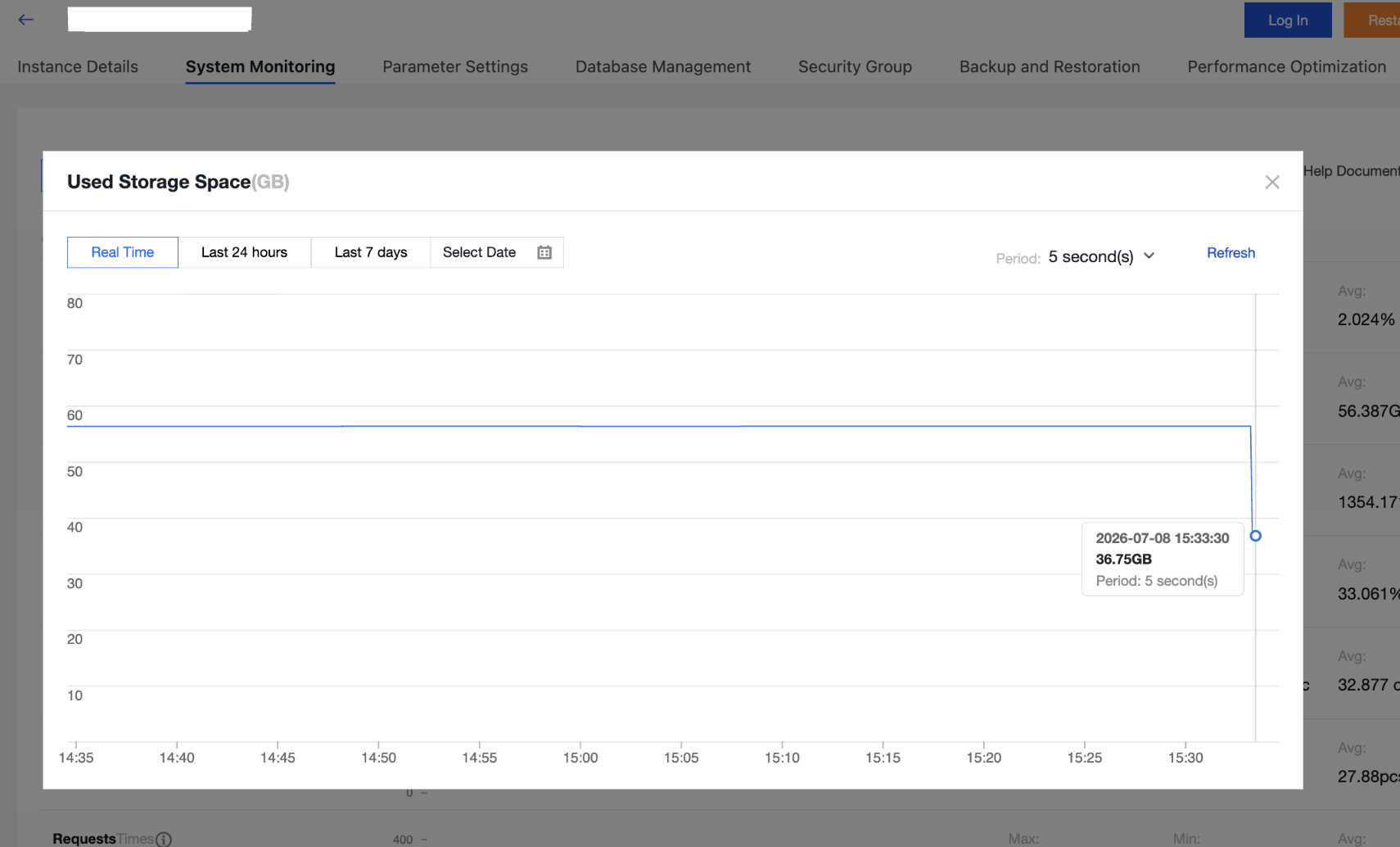
The database itself was still 26GB. The remaining 10GB overhead came from WAL (8GB) plus some extra data files that Tencent support mentioned. The WAL cannot be reduced, so this is as low as it gets.
Reference: TencentDB for PostgreSQL - Execution Log Management