Upgrading SonarQube from Community to Enterprise
A practical walkthrough of upgrading SonarQube from Community to Enterprise edition, covering license management, database cloning pitfalls, and Kubernetes pod restart debugging.

Last week I upgraded our SonarQube from 26.7.0.124771-community to 2026.4.1-enterprise. The upgrade itself was simple, but I hit a few problems along the way. A server ID mismatch from a bad database clone decision, and a pod restart issue that took some debugging. Here is how it went.
Cleaning up before the upgrade
Our license covers 20 million lines of code. Before any upgrade, we needed to free up space. A coworker took care of this part, so I will describe the flow briefly.
He exported the full project list from SonarQube, then filtered for projects that had not been analyzed in more than two years. From that list, he sorted by the largest lines of code. For each candidate, he verified the repository's last commit date and confirmed with the app owner that the project was safe to delete. After getting confirmation, he deleted the projects from SonarQube.
This freed up enough lines of code for the new license.
The server ID and license problem
The SonarQube license is bound to the server ID. So before upgrading the edition, you need to share your server ID with the vendor, they generate the license, and you apply it.
But here is the question. What happens if you upgrade the edition first, without the license applied?
I tested this. The answer is that your pipeline stage still passes. The scanner reports ANALYSIS SUCCESSFUL. But the code is not actually analyzed. The SonarQube API returns this:
"errorMessage": "Analyses suspended. Please set a valid license for the Edition you installed."
It is not a pipeline blocker. It silently fails. That is the kind of thing you only notice when you go looking for the analysis results and find nothing.
So the strategy was clear. Stay on the current Community edition, share the server ID, get the license, then upgrade to Enterprise and inject the license.
Everything went fine at first. I got the license, updated the image tags, and moved on.
The database clone mistake
Here is where I messed up. I have written before about upgrading SonarQube from 10.6.0 to 26.7.0, and my usual pattern is to clone the database before any upgrade. So I did the same thing here.
I created a new database:
CREATE DATABASE sonarqube_enterprise WITH TEMPLATE sonarqube_community;
Then I changed the JDBC URL in the Helm values to point to the new database, sonarqube_enterprise, and updated the image tags to the Enterprise version.
The instance came up. Everything looked normal. But then I realized the problem. Changing the JDBC URL changed the server ID. The license I had was generated for the old server ID, the one tied to the sonarqube_community database name.
This was a facepalm moment. I had created a new database with a new server ID, but the license was for the old one.
The fix was simple enough. I reverted the JDBC URL back to sonarqube_community, kept the Enterprise image tags, and injected the license. The server ID matched, and everything worked.
Looking back, the mistake was obvious. The database name is part of the JDBC URL, and the JDBC URL is part of what generates the server ID. I should have known that.
What I learned about the upgrade flow
If I were doing this again, here is the order I would follow.
First, rename the existing database to sonarqube_enterprise while still on the Community edition. Then, get the server ID from this renamed instance and share it with the vendor. Once you have the license, create a backup database for safety, but do not change the JDBC URL. Then upgrade the image tags to Enterprise and apply the license.
The key insight is simple. Get the server ID after the database is named what you want it to be named long-term. Do not change the JDBC URL after the license is generated.
It is funny, really. The database is now named sonarqube_community but running the Enterprise edition. The name does not match the edition at all. But it works, and the server ID is stable.
The pod restart mystery
After the upgrade was done, I ran a test pipeline that uses this SonarQube instance for code scanning. The SonarQube scan stage passed. But then I noticed the SonarQube pod was restarting.
Every time I applied a Helm change, the pod would shut down and restart. The logs showed it was receiving a stop signal. At first, I thought something was wrong with the application. Maybe the Enterprise edition was crashing under load.
What I ruled out early
I checked the application logs. No out-of-memory errors. No Java exceptions. The application was healthy. The shutdown was graceful, not a crash.
The clue was in the exit code. The pod was exiting with code 130, which is a SIGINT. The Dockerfile for the SonarQube image sets STOPSIGNAL SIGINT. Kubernetes was sending this signal during helm upgrade rolling updates.
The pod was not crashing. The StatefulSet controller was terminating the old pod to start a new one, every time I applied a Helm change. The logs I was seeing were just the graceful shutdown of the old pod.
Resource tuning
Even though the restart was not an application crash, the pod was clearly under-provisioned. The default resource limits were too tight for the Enterprise edition. The Community edition ran fine on the same defaults, but the Enterprise edition is heavier and needs more headroom. I adjusted the resources.
Here is what I changed:

The final memory budget for the 16Gi pod looks like this:
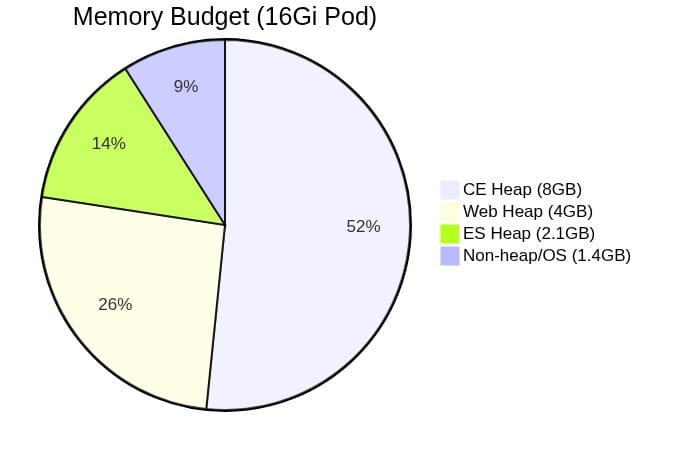
After these changes, the pod stabilized. The CI/CD pipeline can now run project analyses without memory pressure.
Closing
The Enterprise edition of SonarQube is heavier than the Community edition. The resource requirements are real, and the default Helm values will not cut it. If you are upgrading, budget for at least 16Gi of memory and 8 CPU cores for the pod.
The database clone mistake was entirely avoidable. I got lucky that reverting the JDBC URL was enough to fix it. If I had already deleted the old database, I would have needed to go back to the vendor for a new license. That would have been embarrassing.