WebSocket-Based Jenkins Agents in a Reverse Proxy Environment
Switching Jenkins Kubernetes agents from JNLP TCP (port 50000) to WebSocket fixed connectivity issues behind CLB + Nginx L7. WebSocket fits HTTP(S) routing and stabilizes agent-to-controller communication in a proxy-restricted environment.

We run Jenkins in a fairly standard but constrained setup: Jenkins controller sits on a CVM (cloud virtual machine) inside a Docker container, exposed through a CLB (HTTP/HTTPS layer 7). Kubernetes is used for dynamic build agents via the Jenkins Kubernetes plugin.
At a high level, the flow should be simple: Jenkins schedules a job, spins up a pod in Kubernetes, and the pod connects back to the controller as a JNLP agent. In practice, the networking layer in front of Jenkins made this more fragile than expected.
Environment and constraints
The controller is not directly exposed. Traffic goes through a CLB and then to Nginx inside the VM, which proxies into the Jenkins container. We already configured Jenkins with the public domain (jenkins.company.com) so agents are supposed to connect using that endpoint instead of internal IPs.
Kubernetes agents are configured using the standard JNLP launcher. Initially, everything looked fine during provisioning. Pods were created successfully, and logs showed discovery and handshake steps.
The actual issue
When the agent pod started, the remoting logs showed something like this:
INFO: Agent discovery successful
Agent address: jenkins.company.com
Agent port: 50000

INFO: Handshaking
INFO: Server reports protocol JNLP4-connect-proxy not supported, skipping
INFO: Trying protocol: JNLP4-connect
INFO: Connecting to jenkins.company.com:50000
The key problem here is subtle but important: even though we had a domain setup and everything behind L7, the agent still attempted to connect via port 50000 using the classic JNLP TCP channel.
That worked in older setups where we exposed port 50000 directly. In this environment, that port is not properly reachable through CLB/L7 routing. So agents were effectively trying to open a raw TCP connection through a path that does not exist anymore.
Why this breaks
Jenkins remoting has multiple transport modes:
- Classic JNLP TCP (port 50000)
- WebSocket over HTTP(S)
Our infrastructure only reliably supports HTTP(S) traffic through CLB + Nginx. So anything relying on direct TCP (like 50000) becomes unreliable or completely blocked.
Also, the log line: JNLP4-connect-proxy not supported, skipping indicates that the agent is trying to negotiate a protocol that depends on proxy-aware TCP forwarding, which our L7 setup does not support.
Decision: switch to WebSocket agent transport
Instead of fighting TCP routing, we moved the agent communication to WebSocket mode.
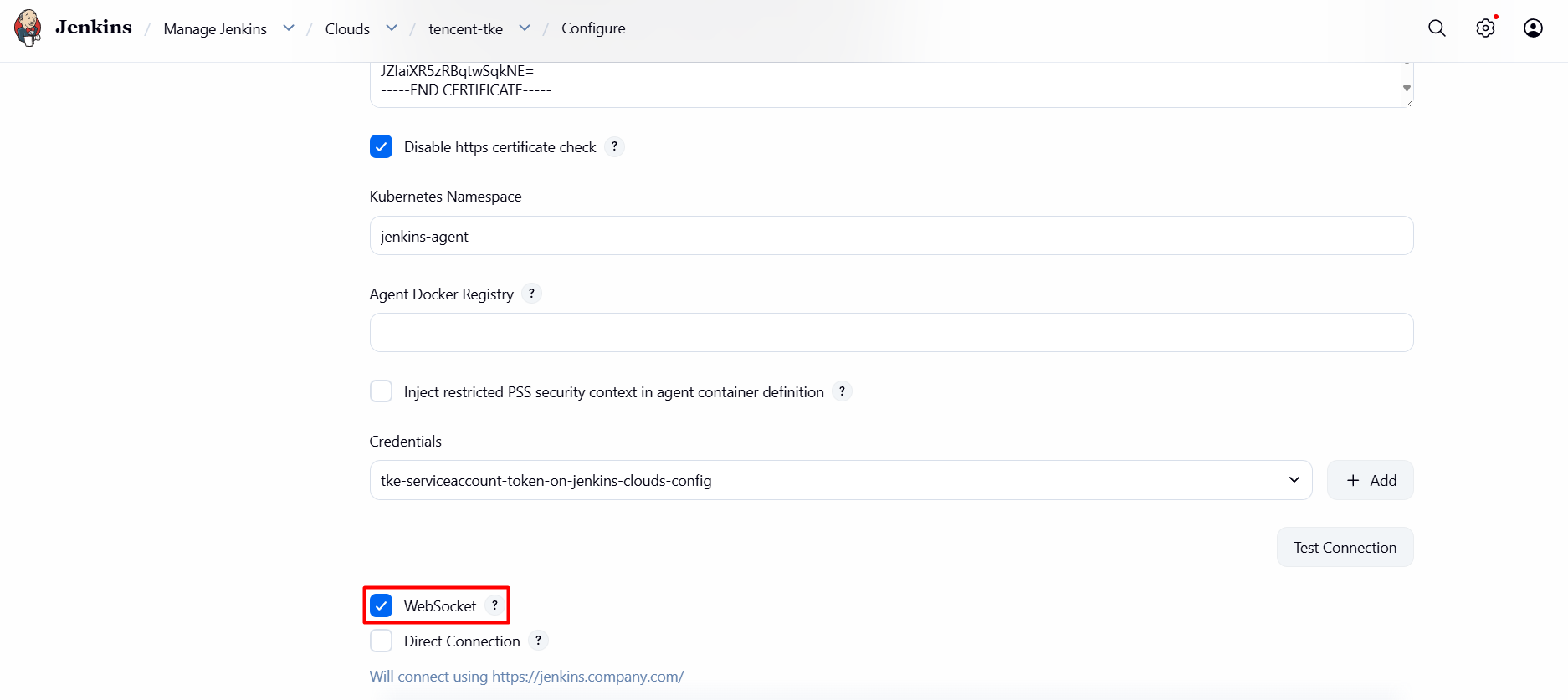
This changes the model completely: instead of Jenkins opening a raw TCP channel, the agent connects back over HTTP(S) and upgrades the connection to WebSocket. This fits cleanly into our existing CLB + Nginx reverse proxy setup.
Reference behavior comes from Jenkins WebSocket remoting support:
https://www.jenkins.io/blog/2020/02/02/web-socket/
Nginx configuration change
To support WebSocket upgrade, we adjusted the reverse proxy layer:
location / {
    proxy_pass http://10.51.3.208:8080; #Jenkins Service

    proxy_set_header Host $host;
    proxy_set_header X-Real-IP $remote_addr;
    proxy_set_header X-Forwarded-For $proxy_add_x_forwarded_for;

    proxy_http_version 1.1;
    proxy_set_header Upgrade $http_upgrade;
    proxy_set_header Connection "Upgrade";
}
The important part is not the basic proxying, it’s the upgrade headers. Without those, WebSocket silently falls back or fails during handshake.
Jenkins agent configuration change
On the Kubernetes agent side, we explicitly switched the launcher to WebSocket mode instead of JNLP TCP. Once that was applied, the behavior changed immediately.
Logs after fix:
INFO: Using Remoting version: 3355.v388858a_47b_33
INFO: Using /home/jenkins/agent/remoting as a remoting work directory
INFO: WebSocket connection open
INFO: Connected
No reference to port 50000 anymore. No TCP handshake attempts. Just HTTP upgrade and connection success.
Result and cleanup
Once WebSocket mode was stable, we were able to safely remove dependency on port 50000 entirely:
- Closed port 50000 in Jenkins container configuration
- Removed exposure in internal networking rules
- Reduced attack surface (no raw JNLP port exposed anymore)
This also simplified the infra a bit because everything is now strictly HTTP(S), based through CLB.